
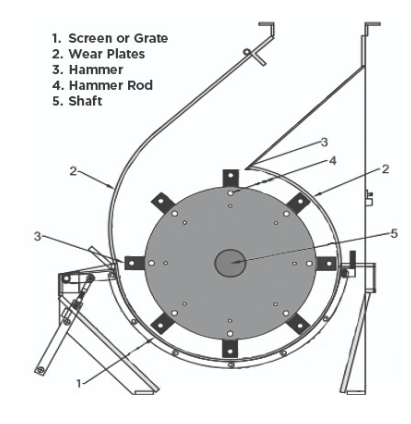
材料のサイズを小さくする機械は、研削要素も摩耗させます. 一般的に, 粉砕する材料が粗いほど, 内部部品の摩耗は早くなります。ハンマーミルの効率的な運転と長寿命を確保するためには, 摩耗部品を定期的に点検し交換することが重要です。
これらの部品にはハンマー, ロッド, 画面, 軸受, 摩耗板が含まれます。. このガイドでは, ハンマーミルが効率的に動作し続けるように、スクリーンまたはグレートを交換する手順について説明します。.
スクリーンまたはグレートの交換
注意: この作業は2人で行う必要があります。ステップ 10.
- 主電源ブレーカーを切る.
- 現場のOSHA承認済みのロックアウト/タグアウト手順を使用して主スイッチを固定する.
- ミルのフードを開ける.
- ハンドルを使ってリアスクリーンを引き出す
- Remove the handle from the rear screen so that you can attach it to the new screen.
- Unbolt the front cover plate.
- Unfasten bolts for the front screen.
- Remove the front screen.
- Insert the new screen and push it as far forward as possible so that the second operator can reach it.
- At the front of the mill, the second operator pulls the screen upward and bolts the fixing angles into place.
- Replace the front cover plate.
- Fasten the bolts.
- Fasten the handle to the new rear screen.
- Place the rear screen.
- Make sure the finger plates of the front screen meshes with the finger plates of the rear screen.
- Close the mill hood.